 USD
USD EUR
EUR GBP
GBP CAD
CAD AUD
AUD HKD
HKD JPY
JPY KRW
KRW SGD
SGD NZD
NZD THB
THB TWD
TWD 繁體中文
繁體中文 日本語
日本語 한국어
한국어 English


By Android TV Box | 04 July 2026 | 0 Comments
EVPAD 12 Review: A Tiny Streaming Box That Claims to Unlock TV From Around the World
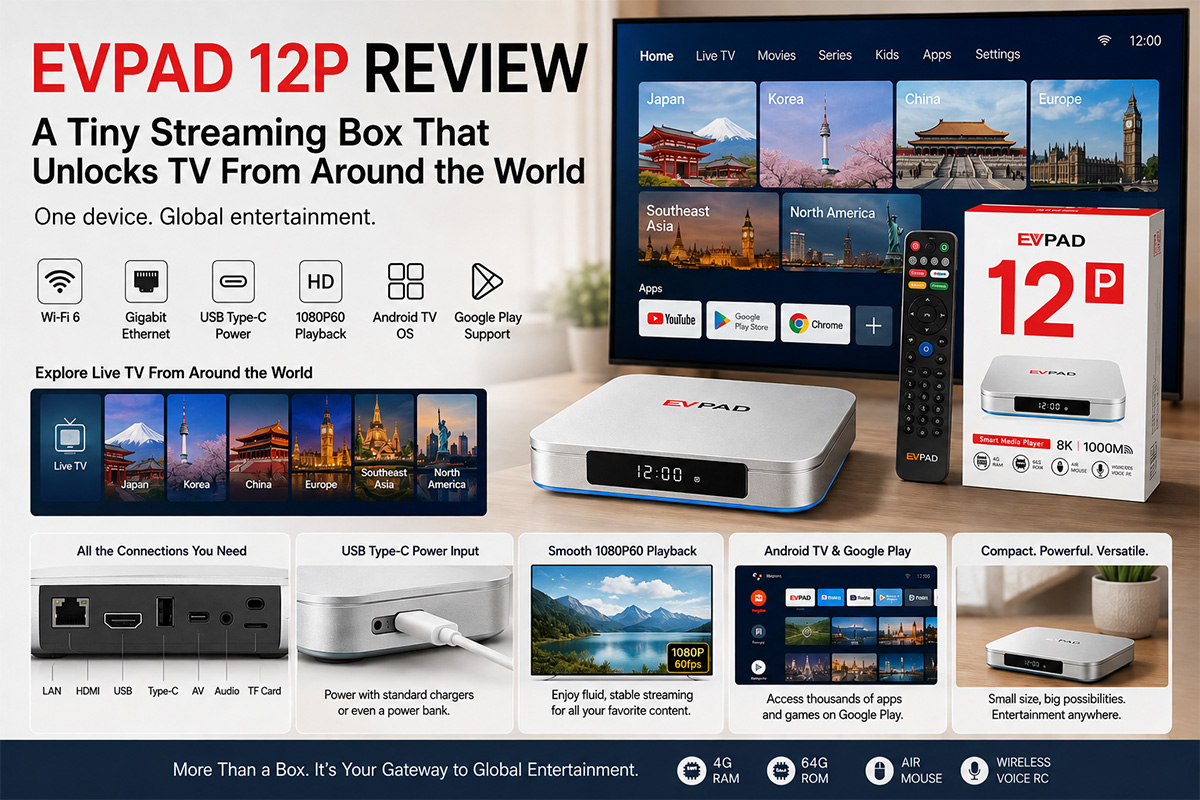
The Android TV box market is full of streaming devices, but every so often a product appears that generates far more discussion than the rest. One of those devices is the EVPAD 12P, often referred to online as a "magic box" because of its promise to provide access to an enormous library of live TV channels and on-demand content after a one-time purchase.
That claim naturally raises an important question:
Can a single streaming box really replace multiple streaming subscriptions?
To find out, let's take a closer look at the EVPAD 12P, from its hardware and software to its unique features and the legal questions surrounding it.
First Impressions
The EVPAD 12P arrives in a colorful retail package with a modern design.
Inside the box, you'll find:
EVPAD 12P streaming box
Bluetooth remote control
HDMI cable
USB Type-C power cable
User manual
The device itself has a clean silver finish that feels more premium than many inexpensive Android TV boxes.
Ports and Connectivity
Despite its compact size, the EVPAD 12P includes plenty of connection options:
HDMI output
Gigabit Ethernet port
USB-A port
USB Type-C power input
microSD card slot
AV output
Digital audio output
One welcome addition is the USB Type-C power connector. Since it uses the same connector as many smartphones, the device can be powered by standard USB chargers or even a compatible power bank.
This also opens the possibility of using it in vehicles equipped with compatible display systems.
Easy Setup
Getting started is straightforward.
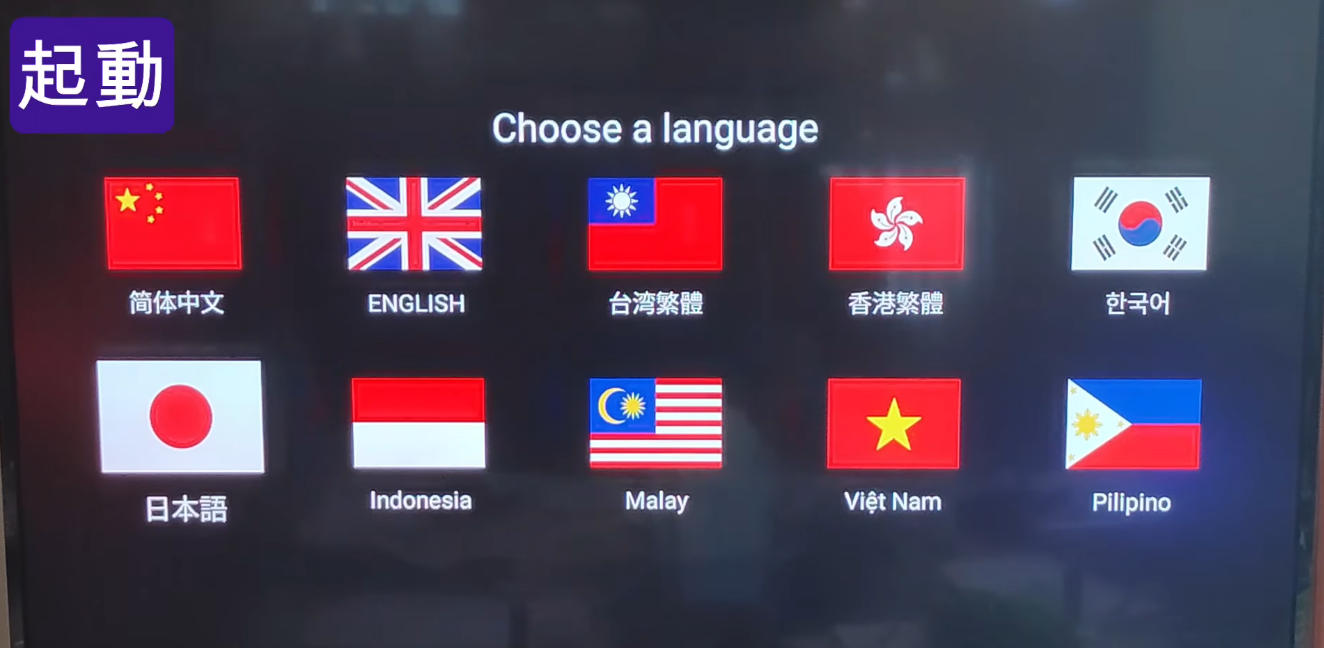
After powering on the device, users select their preferred language, connect to Wi-Fi or Ethernet, and complete the standard Android TV setup process.
The home screen looks very familiar, offering access to applications such as:
YouTube
Google Play Store
Chrome browser
At first glance, it behaves like a typical Android TV box.
What Makes EVPAD Different?
The biggest reason people talk about EVPAD isn't the hardware—it's the software ecosystem.
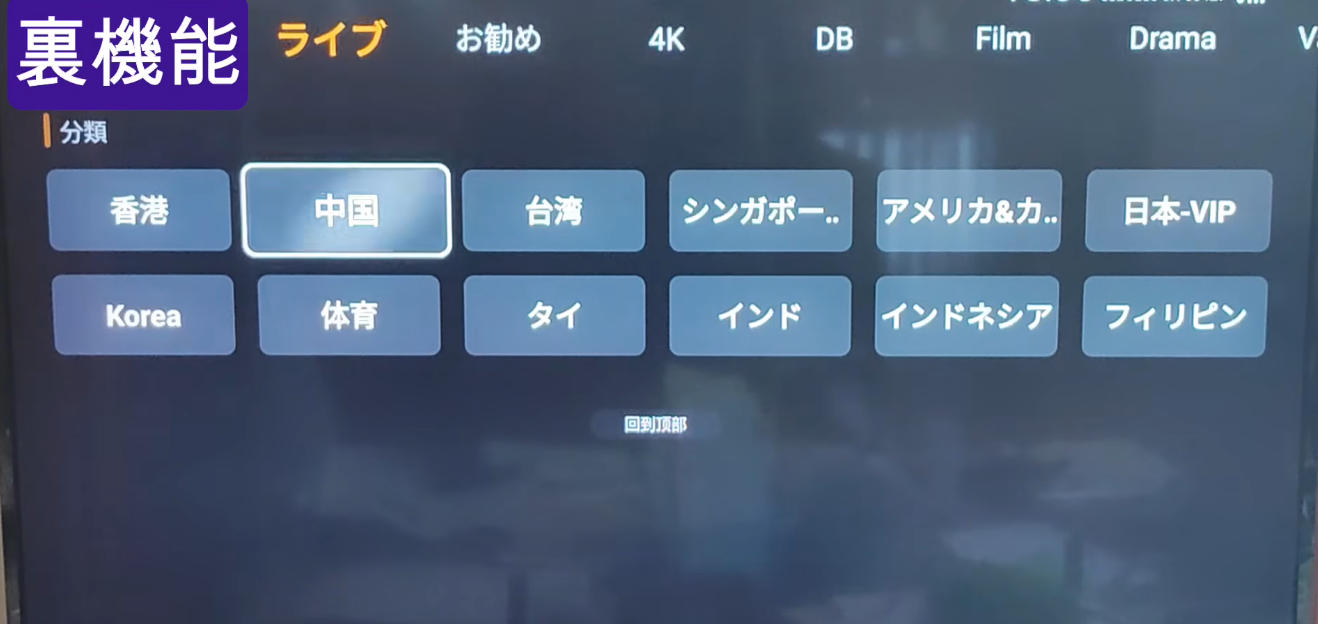
Within the custom application section are several proprietary apps that can be downloaded and installed through the device.
After installation, these applications present categories organized by country or region.
Depending on the services available, users may find television channels from locations including:
Japan
South Korea
China
Europe
Southeast Asia
North America
The interface is simple and allows users to browse live television and other streaming content from different parts of the world.
For people living overseas, the idea of accessing familiar television programming from their home country is understandably attractive.
Performance
From a hardware perspective, the EVPAD 12P is not designed as a flagship Android device.
However, it performs well for media playback.
During testing:
1080p60 YouTube videos played smoothly.
Navigation felt responsive.
Streaming performance remained stable.
Wi-Fi 6 provided reliable wireless connectivity.
Gigabit Ethernet offered even more consistent playback for high-bitrate content.
For watching online video, the hardware is more than capable.
User Experience
One advantage of Android TV is flexibility.
Because Google Play is available, users can install many familiar apps alongside the manufacturer's own software.
The interface is relatively easy to navigate, making it suitable even for users who are not particularly technical.
The remote control is straightforward and includes quick-access buttons for commonly used services.
Legal and Copyright Considerations
One of the reasons EVPAD remains controversial is the type of content some users report accessing through third-party applications.
The hardware itself is simply an Android-based streaming device. However, users may choose to install additional applications that provide access to various online streaming sources.
Whether those streams are authorized depends entirely on the content provider and the user's jurisdiction.
Before using any streaming service, users should ensure they comply with local copyright laws and use only legally licensed content.
Pros
Compact, attractive design
USB Type-C power input
Wi-Fi 6 support
Gigabit Ethernet
Smooth HD video playback
Android TV flexibility
Large selection of downloadable applications
Cons
Some features may raise copyright concerns depending on how the device is used
Software ecosystem can be confusing for first-time users
Long-term availability of third-party services cannot be guaranteed
Final Verdict
The EVPAD 12P is certainly one of the most talked-about Android TV boxes on the market.
From a hardware perspective, it offers solid connectivity, stable streaming performance, and a user-friendly Android experience.
Its biggest appeal comes from its extensive software ecosystem and the wide range of content that users may be able to access through additional applications. At the same time, prospective buyers should be aware that the legality and availability of some third-party streaming sources may vary by country and over time.
If you're looking for a versatile Android TV box with strong media playback capabilities and broad app support, the EVPAD 12 is an interesting device to explore—but it's important to use it responsibly and ensure that any content you access is properly licensed under your local laws.
That claim naturally raises an important question:
Can a single streaming box really replace multiple streaming subscriptions?
To find out, let's take a closer look at the EVPAD 12P, from its hardware and software to its unique features and the legal questions surrounding it.
First Impressions
The EVPAD 12P arrives in a colorful retail package with a modern design.
Inside the box, you'll find:
EVPAD 12P streaming box
Bluetooth remote control
HDMI cable
USB Type-C power cable
User manual
The device itself has a clean silver finish that feels more premium than many inexpensive Android TV boxes.
Ports and Connectivity
Despite its compact size, the EVPAD 12P includes plenty of connection options:
HDMI output
Gigabit Ethernet port
USB-A port
USB Type-C power input
microSD card slot
AV output
Digital audio output
One welcome addition is the USB Type-C power connector. Since it uses the same connector as many smartphones, the device can be powered by standard USB chargers or even a compatible power bank.
This also opens the possibility of using it in vehicles equipped with compatible display systems.
Easy Setup
Getting started is straightforward.
After powering on the device, users select their preferred language, connect to Wi-Fi or Ethernet, and complete the standard Android TV setup process.
The home screen looks very familiar, offering access to applications such as:
YouTube
Google Play Store
Chrome browser
At first glance, it behaves like a typical Android TV box.
What Makes EVPAD Different?
The biggest reason people talk about EVPAD isn't the hardware—it's the software ecosystem.
Within the custom application section are several proprietary apps that can be downloaded and installed through the device.
After installation, these applications present categories organized by country or region.
Depending on the services available, users may find television channels from locations including:
Japan
South Korea
China
Europe
Southeast Asia
North America
The interface is simple and allows users to browse live television and other streaming content from different parts of the world.
For people living overseas, the idea of accessing familiar television programming from their home country is understandably attractive.
Performance
From a hardware perspective, the EVPAD 12P is not designed as a flagship Android device.
However, it performs well for media playback.
During testing:
1080p60 YouTube videos played smoothly.
Navigation felt responsive.
Streaming performance remained stable.
Wi-Fi 6 provided reliable wireless connectivity.
Gigabit Ethernet offered even more consistent playback for high-bitrate content.
For watching online video, the hardware is more than capable.
User Experience
One advantage of Android TV is flexibility.
Because Google Play is available, users can install many familiar apps alongside the manufacturer's own software.
The interface is relatively easy to navigate, making it suitable even for users who are not particularly technical.
The remote control is straightforward and includes quick-access buttons for commonly used services.
Legal and Copyright Considerations
One of the reasons EVPAD remains controversial is the type of content some users report accessing through third-party applications.
The hardware itself is simply an Android-based streaming device. However, users may choose to install additional applications that provide access to various online streaming sources.
Whether those streams are authorized depends entirely on the content provider and the user's jurisdiction.
Before using any streaming service, users should ensure they comply with local copyright laws and use only legally licensed content.
Pros
Compact, attractive design
USB Type-C power input
Wi-Fi 6 support
Gigabit Ethernet
Smooth HD video playback
Android TV flexibility
Large selection of downloadable applications
Cons
Some features may raise copyright concerns depending on how the device is used
Software ecosystem can be confusing for first-time users
Long-term availability of third-party services cannot be guaranteed
Final Verdict
The EVPAD 12P is certainly one of the most talked-about Android TV boxes on the market.
From a hardware perspective, it offers solid connectivity, stable streaming performance, and a user-friendly Android experience.
Its biggest appeal comes from its extensive software ecosystem and the wide range of content that users may be able to access through additional applications. At the same time, prospective buyers should be aware that the legality and availability of some third-party streaming sources may vary by country and over time.
If you're looking for a versatile Android TV box with strong media playback capabilities and broad app support, the EVPAD 12 is an interesting device to explore—but it's important to use it responsibly and ensure that any content you access is properly licensed under your local laws.


