 USD
USD EUR
EUR GBP
GBP CAD
CAD AUD
AUD HKD
HKD JPY
JPY KRW
KRW SGD
SGD NZD
NZD THB
THB TWD
TWD 繁體中文
繁體中文 日本語
日本語 한국어
한국어 English


By Android TV Box | 14 July 2026 | 0 Comments
The Hidden Feature of DIGIBox D6 Max You Need to Know
When choosing an Android TV box, most users usually focus on the basic specifications — processor, RAM, storage, and video quality. But after testing the DIGIBox D6 Max, I discovered a feature that many people may not know about.
Beyond being a powerful streaming device, the DIGIBox D6 Max comes with a surprisingly useful function: you can control the TV box directly from your smartphone, turning your phone into a smart remote, Air Mouse, and even a game controller.
In this full unboxing review, let's take a closer look at the design, performance, system experience, and hidden features of the DIGIBox D6 Max.
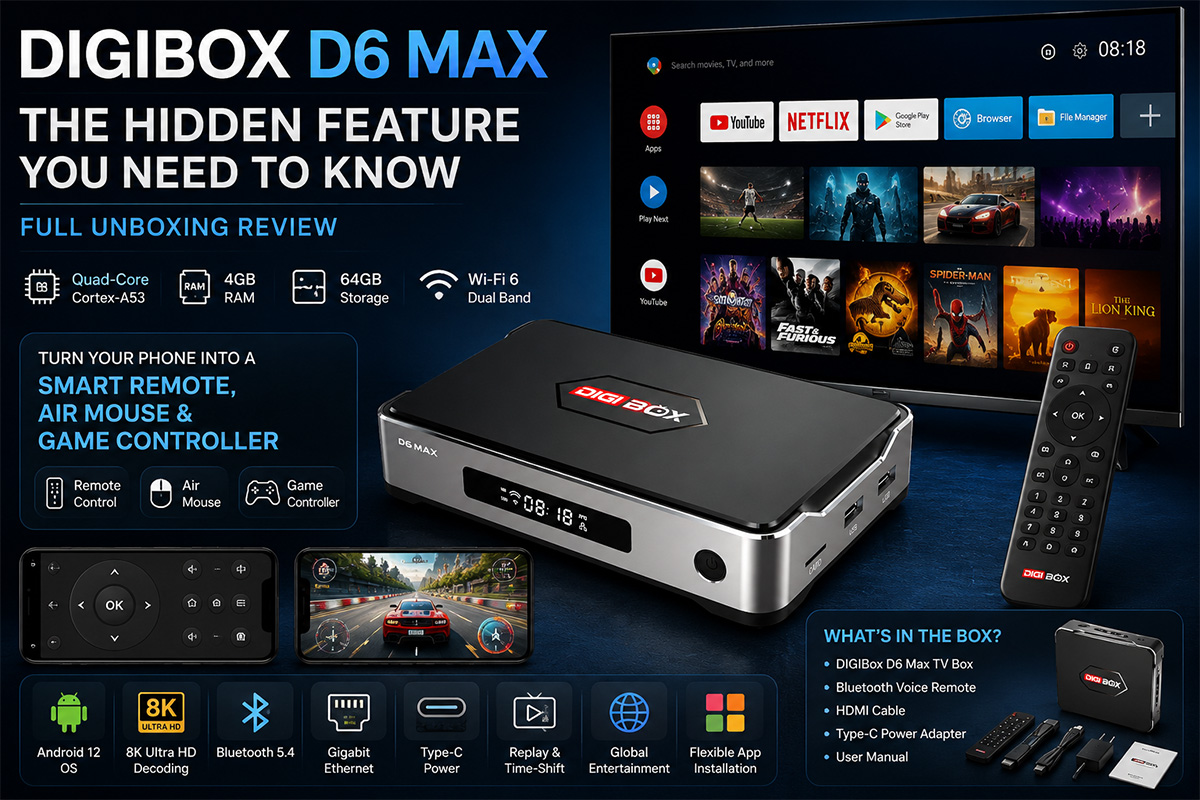
Premium Design That Stands Out
The first thing that caught my attention was the design.
Unlike many Android TV boxes that use a simple plastic shell, the DIGIBox D6 Max feels more premium right out of the box.
The device features an elegant aluminum frame combined with a compact body design. The metal sides not only improve the overall appearance but also help with heat dissipation during long-term use.
On the front, you will find:
A stylish display panel
DIGIBox branding
A physical power button
The overall design feels closer to a premium media player rather than a traditional TV box.
What's Inside the Box?
The DIGIBox D6 Max package includes everything needed for setup:
DIGIBox D6 Max TV Box
HDMI cable
USB Type-C power adapter
Bluetooth voice remote
User manual
One detail worth mentioning is the USB Type-C power connection.
Many TV boxes still use traditional DC power ports, but the D6 Max adopts a modern Type-C interface, making it more convenient and compatible with today's charging accessories.
Powerful Hardware for Smooth Entertainment
The DIGIBox D6 Max comes with a balanced hardware configuration designed for streaming, apps, and multimedia entertainment.
Key specifications:
Android 12 OS
Quad-Core ARM Cortex-A53 CPU
4GB RAM
64GB eMMC storage
Mali-G31 MP2 GPU
Wi-Fi 6 dual-band connection
Bluetooth 5.4
Gigabit Ethernet
8K Ultra HD decoding support
With 4GB RAM and 64GB storage, users have enough space for applications, media files, and entertainment content.
A Simple and Beautiful Setup Experience
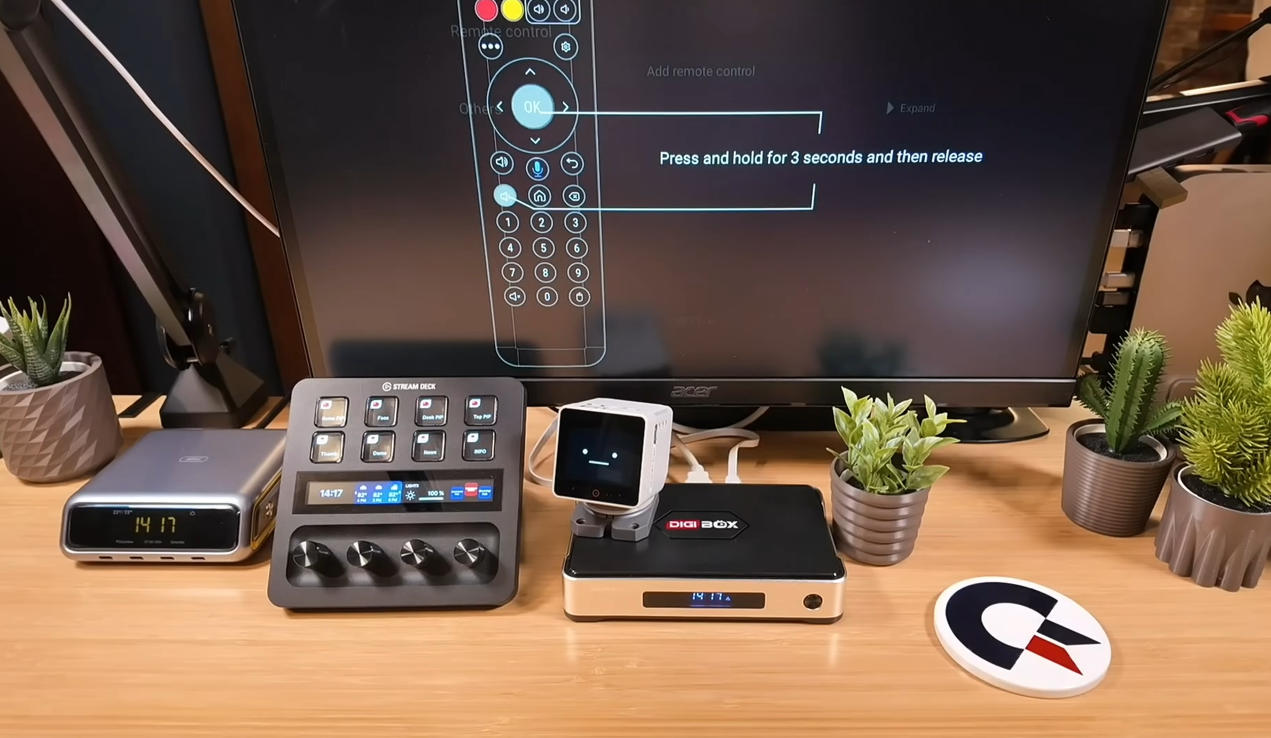
After connecting the HDMI cable, network cable, and power supply, the DIGIBox D6 Max starts quickly.
The setup process is simple:
Pair the Bluetooth remote
Select your language
Connect to the internet
Complete the initial settings
One of the most impressive parts is the language selection interface.
Instead of the usual Android text menu, DIGIBox uses a global flag-based language selection design, making the setup process more intuitive for users around the world.
A Clean Android TV Interface
The DIGIBox D6 Max provides a clean and user-friendly launcher.
Unlike some Android TV boxes that come with too many unnecessary applications, the D6 Max keeps the system simple.
The home screen includes:
Browser
YouTube
Netflix
Google Play Store
File Manager
Installed applications
The interface is fast, responsive, and easy to customize.
The Hidden Feature: Turn Your Phone Into a Smart Remote
This is the feature that surprised me the most.
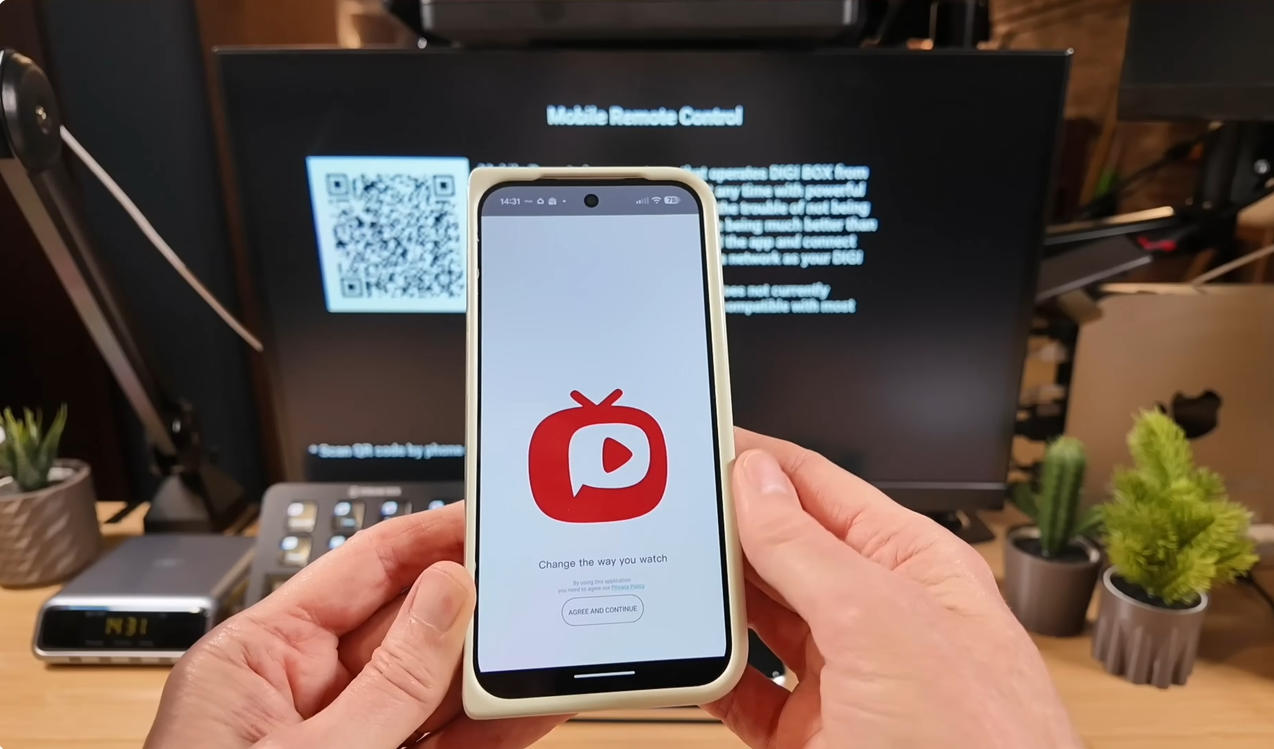
The DIGIBox D6 Max supports a mobile remote control application.
After scanning the QR code and installing the app, your smartphone can connect directly to the TV box.
Your phone can now work as:
A Normal Remote Control
You can control:
Navigation
Volume
Home screen
Applications
An Air Mouse
The smartphone can also become a motion-controlled mouse.
Simply move your phone, and the cursor moves on the TV screen.
This is especially useful when:
Browsing websites
Installing APK files
Using apps that require mouse control
A Gaming Controller
Another interesting feature is gamepad mode.
Your smartphone can become a virtual controller, allowing you to enjoy Android games without purchasing an additional controller.
For users who enjoy retro games or casual gaming, this is a very useful addition.
Smart Bluetooth Remote With Air Mouse Function
The included remote control also offers more than standard TV box remotes.
It supports:
Voice search
Bluetooth connection
Air Mouse control
TV control functions
The Air Mouse function makes navigation much easier when using apps that are not fully optimized for traditional TV remotes.
Flexible App Installation
The DIGIBox D6 Max gives users plenty of freedom when installing applications.
You can download apps through:
Google Play Store
DIGIBox App Store
APK installation
Popular applications and media tools can be installed according to your personal needs.
This flexibility makes the device suitable for users who like customizing their Android TV experience.
Global Entertainment Experience
The DIGIBox D6 Max also includes access to DIGIBox's entertainment ecosystem.
Applications include:
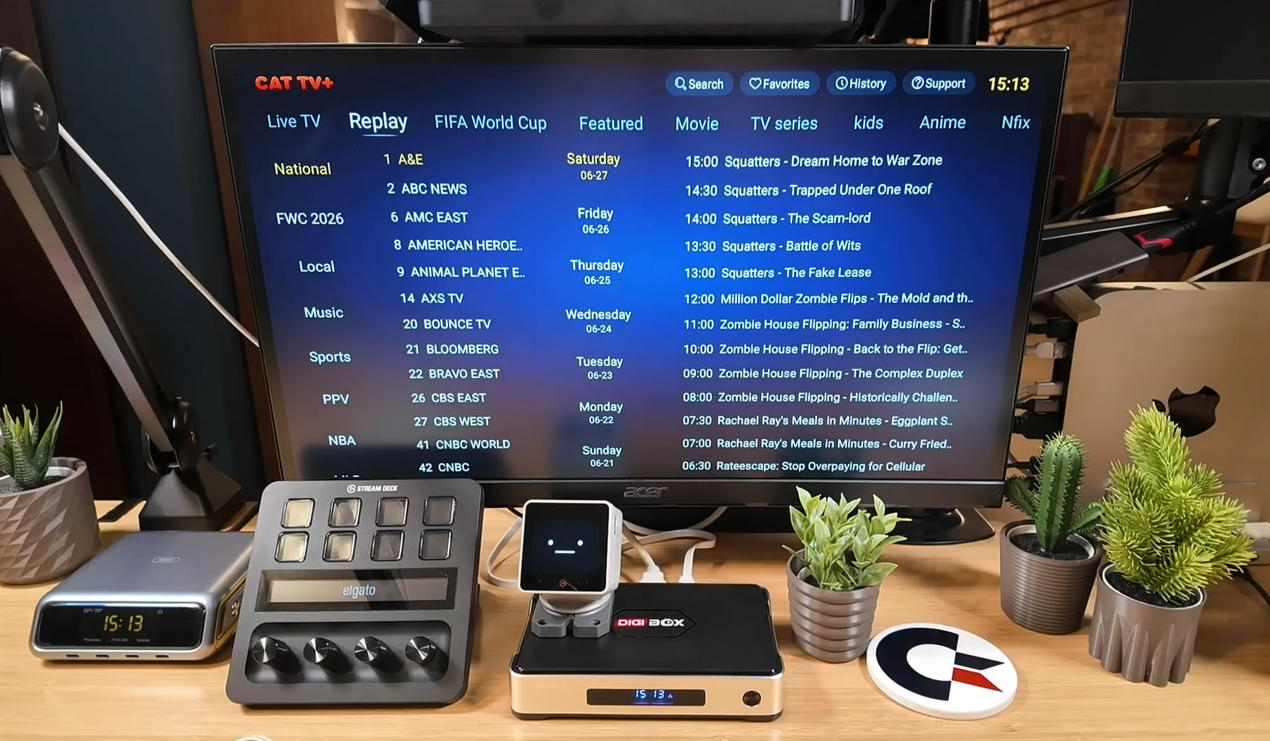
CAT TV+
CAT Live
CAT Asia
J-CAT VOD
CAT Tele
Users can enjoy:
Live TV channels
Movies
TV shows
Sports content
International programs
The device also supports replay and time-shift functions for supported channels.
A Powerful Home Media Center
The DIGIBox D6 Max is not only designed for online streaming.
With the built-in file manager, users can also play their own media files.
Supported features include:
USB storage playback
Local video playback
Music playback
Photo viewing
Network file sharing
It can easily become the center of your home entertainment system.
Final Thoughts
After testing the DIGIBox D6 Max, the biggest surprise was not only its hardware specifications, but also its hidden features.
The combination of:
Smartphone remote control
Air Mouse support
Gamepad mode
Clean Android interface
Powerful connectivity options
Flexible app installation
makes the DIGIBox D6 Max more than just a regular Android TV box.
It is a versatile entertainment device designed for users who want more control and more possibilities.
If you enjoy exploring Android TV features and customizing your home entertainment setup, the DIGIBox D6 Max is definitely worth checking out.
DIGIBox D6 Max — a smarter way to experience your TV.
Beyond being a powerful streaming device, the DIGIBox D6 Max comes with a surprisingly useful function: you can control the TV box directly from your smartphone, turning your phone into a smart remote, Air Mouse, and even a game controller.
In this full unboxing review, let's take a closer look at the design, performance, system experience, and hidden features of the DIGIBox D6 Max.
Premium Design That Stands Out
The first thing that caught my attention was the design.
Unlike many Android TV boxes that use a simple plastic shell, the DIGIBox D6 Max feels more premium right out of the box.
The device features an elegant aluminum frame combined with a compact body design. The metal sides not only improve the overall appearance but also help with heat dissipation during long-term use.
On the front, you will find:
A stylish display panel
DIGIBox branding
A physical power button
The overall design feels closer to a premium media player rather than a traditional TV box.
What's Inside the Box?
The DIGIBox D6 Max package includes everything needed for setup:
DIGIBox D6 Max TV Box
HDMI cable
USB Type-C power adapter
Bluetooth voice remote
User manual
One detail worth mentioning is the USB Type-C power connection.
Many TV boxes still use traditional DC power ports, but the D6 Max adopts a modern Type-C interface, making it more convenient and compatible with today's charging accessories.
Powerful Hardware for Smooth Entertainment
The DIGIBox D6 Max comes with a balanced hardware configuration designed for streaming, apps, and multimedia entertainment.
Key specifications:
Android 12 OS
Quad-Core ARM Cortex-A53 CPU
4GB RAM
64GB eMMC storage
Mali-G31 MP2 GPU
Wi-Fi 6 dual-band connection
Bluetooth 5.4
Gigabit Ethernet
8K Ultra HD decoding support
With 4GB RAM and 64GB storage, users have enough space for applications, media files, and entertainment content.
A Simple and Beautiful Setup Experience
After connecting the HDMI cable, network cable, and power supply, the DIGIBox D6 Max starts quickly.
The setup process is simple:
Pair the Bluetooth remote
Select your language
Connect to the internet
Complete the initial settings
One of the most impressive parts is the language selection interface.
Instead of the usual Android text menu, DIGIBox uses a global flag-based language selection design, making the setup process more intuitive for users around the world.
A Clean Android TV Interface
The DIGIBox D6 Max provides a clean and user-friendly launcher.
Unlike some Android TV boxes that come with too many unnecessary applications, the D6 Max keeps the system simple.
The home screen includes:
Browser
YouTube
Netflix
Google Play Store
File Manager
Installed applications
The interface is fast, responsive, and easy to customize.
The Hidden Feature: Turn Your Phone Into a Smart Remote
This is the feature that surprised me the most.
The DIGIBox D6 Max supports a mobile remote control application.
After scanning the QR code and installing the app, your smartphone can connect directly to the TV box.
Your phone can now work as:
A Normal Remote Control
You can control:
Navigation
Volume
Home screen
Applications
An Air Mouse
The smartphone can also become a motion-controlled mouse.
Simply move your phone, and the cursor moves on the TV screen.
This is especially useful when:
Browsing websites
Installing APK files
Using apps that require mouse control
A Gaming Controller
Another interesting feature is gamepad mode.
Your smartphone can become a virtual controller, allowing you to enjoy Android games without purchasing an additional controller.
For users who enjoy retro games or casual gaming, this is a very useful addition.
Smart Bluetooth Remote With Air Mouse Function
The included remote control also offers more than standard TV box remotes.
It supports:
Voice search
Bluetooth connection
Air Mouse control
TV control functions
The Air Mouse function makes navigation much easier when using apps that are not fully optimized for traditional TV remotes.
Flexible App Installation
The DIGIBox D6 Max gives users plenty of freedom when installing applications.
You can download apps through:
Google Play Store
DIGIBox App Store
APK installation
Popular applications and media tools can be installed according to your personal needs.
This flexibility makes the device suitable for users who like customizing their Android TV experience.
Global Entertainment Experience
The DIGIBox D6 Max also includes access to DIGIBox's entertainment ecosystem.
Applications include:
CAT TV+
CAT Live
CAT Asia
J-CAT VOD
CAT Tele
Users can enjoy:
Live TV channels
Movies
TV shows
Sports content
International programs
The device also supports replay and time-shift functions for supported channels.
A Powerful Home Media Center
The DIGIBox D6 Max is not only designed for online streaming.
With the built-in file manager, users can also play their own media files.
Supported features include:
USB storage playback
Local video playback
Music playback
Photo viewing
Network file sharing
It can easily become the center of your home entertainment system.
Final Thoughts
After testing the DIGIBox D6 Max, the biggest surprise was not only its hardware specifications, but also its hidden features.
The combination of:
Smartphone remote control
Air Mouse support
Gamepad mode
Clean Android interface
Powerful connectivity options
Flexible app installation
makes the DIGIBox D6 Max more than just a regular Android TV box.
It is a versatile entertainment device designed for users who want more control and more possibilities.
If you enjoy exploring Android TV features and customizing your home entertainment setup, the DIGIBox D6 Max is definitely worth checking out.
DIGIBox D6 Max — a smarter way to experience your TV.


