 USD
 EUR
 GBP
 CAD
 AUD
 HKD
 JPY
 KRW
 SGD
 NZD
 THB
 TWD
 繁體中文
 日本語
 한국어
 English


DIGIBOX D6 Max Review: Features, Setup, Live TV & VOD Explained
If you are looking to turn any standard TV or office monitor into a fully featured smart media hub, hardware streaming boxes are usually the go-to solution. Today, we’re taking an in-depth look at the DIGIBOX D6 Max—an Android-based TV box designed to unify standard streaming, global live TV, and extensive video-on-demand (VOD) services into a single compact device.
In this review, we’ll cover its design, performance, standout features, setup process, and the pros and cons to help you decide if it’s worth the price tag.
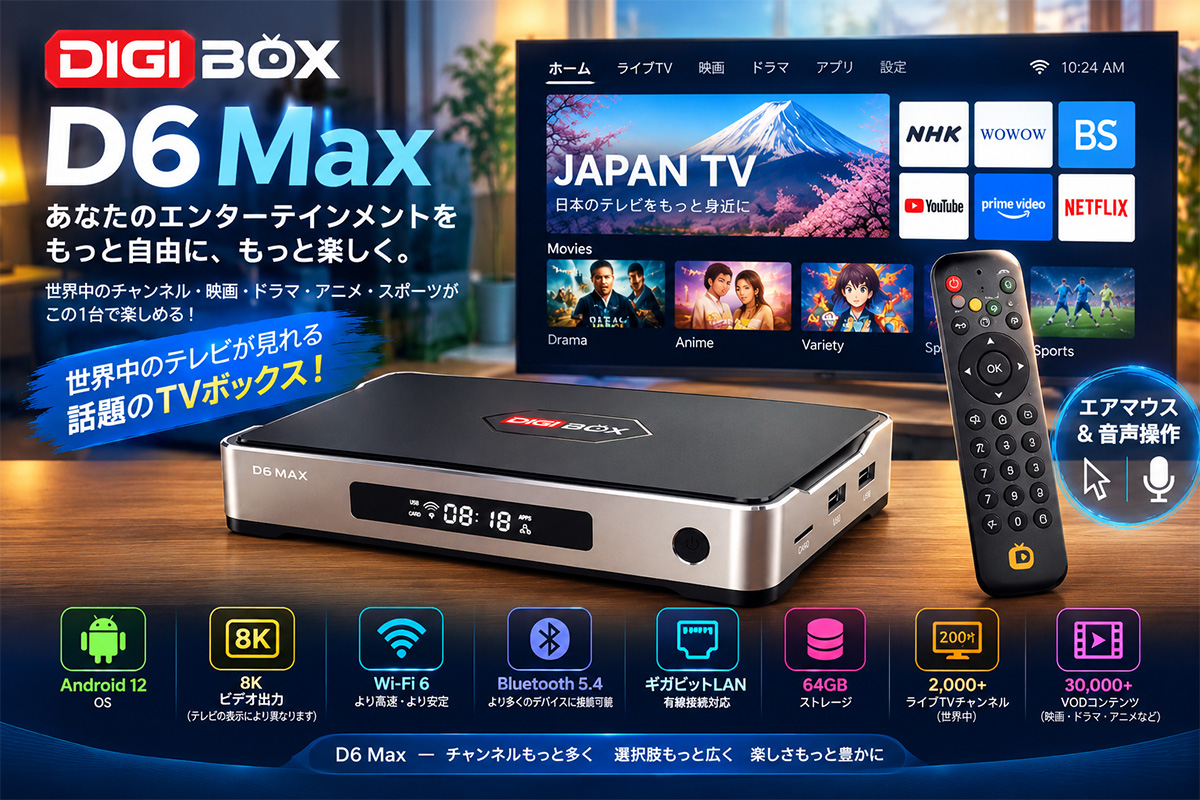
1. Design & Hardware Specifications
Out of the box, the DIGIBOX D6 Max sports a clean, minimalist design that fits easily into any home entertainment setup.
Key Hardware Highlights:
-
Operating System: Android 12
-
Storage: 64 GB internal storage
-
Video Output: Up to 8K resolution (dependent on display, content, and internet speed)
-
Connectivity: Wi-Fi 6, Gigabit LAN port, Bluetooth 5.4, HDMI output, and USB expansion ports.
The inclusion of both Wi-Fi 6 and Gigabit Ethernet ensures ultra-stable network streaming, which is essential when handling high-bitrate media or live feeds.
2. Remote Control: Air Mouse & Voice Features
A streaming box is only as good as its remote, and DIGIBOX nailed the operability here. Along with standard directional navigation buttons, the remote features two massive quality-of-life upgrades:
-
Air Mouse Mode: Toggling this button lets you control a cursor on the screen simply by moving the remote in the air. This is a game-changer for navigating Android apps that aren't optimized for standard D-pads.
-
Voice Control: Built-in voice commands allow you to search for titles, launch apps, and navigate without tedious text entry.
3. Initial Setup & Home Screen Experience
Setting up the DIGIBOX D6 Max is straightforward:
-
Connect the HDMI cable to your TV or monitor.
-
Plug in the power adapter.
-
Follow the standard Android setup screen to select your language and connect to Wi-Fi or Ethernet.
The interface is snappy and responsive. Swapping between apps, launching video feeds, and scrolling through menus feel smooth without noticeable lag. Alongside standard apps like YouTube, the home screen provides direct access to DIGIBOX’s proprietary streaming applications.

4. Key Feature: Live TV & Time-Shift Function
The headline feature of the DIGIBOX D6 Max is its dedicated Live TV interface, offering access to over 2,000 international live channels categorized by region and content type.
7-Day (168-Hour) Time-Shift Replay
One of the most impressive capabilities is the Time-Shift function. DIGIBOX allows you to go back up to 168 hours (7 days) to replay past broadcasts. If you miss a live match or a scheduled broadcast, you can simply scrub back through the guide and watch it at your convenience.
5. Video-on-Demand (VOD) & Google Play Support
Beyond live broadcasting, the device houses a massive VOD library featuring over 30,000 titles, including movies, TV dramas, and anime.
-
On-Demand Streaming: Functions similarly to major streaming platforms with searchable categories and title filters.
-
Google Play Integration: Because it runs on Android 12, you are not locked into DIGIBOX apps alone. You can download compatible third-party apps via the Google Play Store, or stream music via Bluetooth 5.4 to external wireless speakers or headphones.
6. Drawbacks & Points to Consider
While the DIGIBOX D6 Max delivers solid hardware and features, there are a few caveats potential buyers should keep in mind:
1. Translation & Subtitle Quality
If you rely heavily on Japanese subtitling or dubbing for international content, the experience can be hit-or-miss:
-
Audio: Foreign titles rarely feature localized dubbing and rely mostly on original audio.
-
Subtitles: Some subtitles feel like machine-generated auto-translations rather than official localizations. Minor nuances can get lost—for example, straightforward phrases like "Leave it to me" might translate awkwardly to rigid phrasing like "I will take care of it."
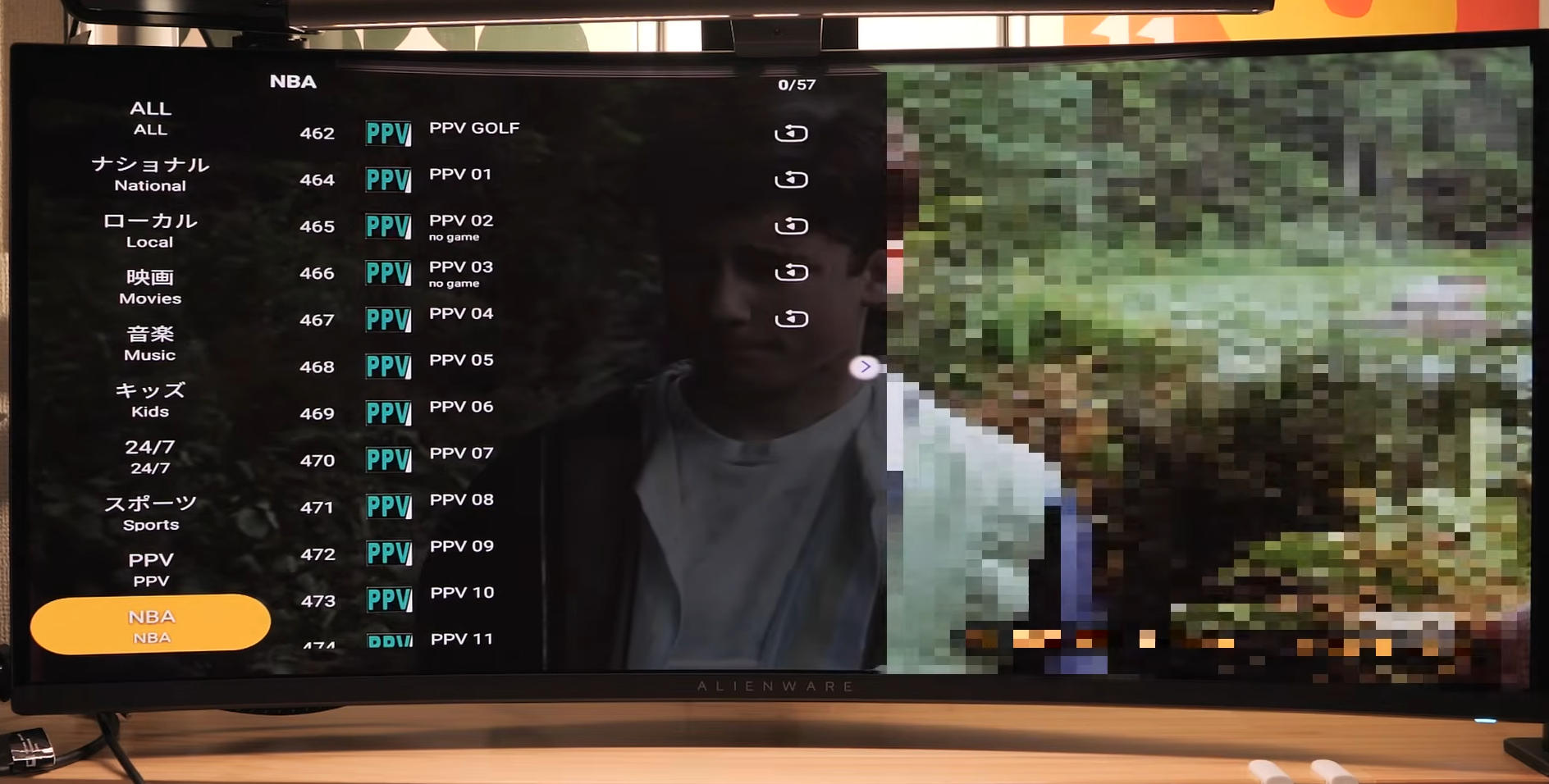
2. Premium Price Tag
The D6 Max carries a higher price tag than standard streaming sticks (like a Chromecast or Fire TV Stick). If you only plan to stream YouTube or major paid platforms (like Netflix or Prime Video), a budget streaming device might be a more cost-effective choice.
Pros & Cons Summary
The Highlights (What We Liked)
-
All-in-One Content Hub: Combines live global TV, a vast VOD library, and standard Android streaming apps on a single device.
-
7-Day Time-Shift Replay: Allows you to go back up to 168 hours to watch missed live broadcasts.
-
Responsive Remote: Features an intuitive Air Mouse mode and built-in voice control for effortless navigation.
-
Top-Tier Connectivity: Supports fast Wi-Fi 6, a wired Gigabit LAN port, and Bluetooth 5.4 for reliable streaming and audio pairing.
-
Smooth Performance: Runs on Android 12 with 64GB storage, delivering snappy navigation and app switching.
The Drawbacks (Things to Consider)
-
Higher Price Point: Considerably more expensive than basic streaming sticks or entry-level TV boxes.
-
Subtitle Quality: Foreign content heavily relies on machine-translated subtitles, which can occasionally feel awkward or unnatural.
-
Lineup Fluctuations: The availability of specific live TV channels and VOD titles may change over time.
-
Overkill for Basic Users: If you only stream standard platforms like YouTube, cheaper alternative devices will suffice.
Final Verdict
The DIGIBOX D6 Max is an impressive all-in-one media solution. By consolidating live global television, on-demand playback, time-shift capabilities, and standard Android app support into a single fast device, it provides an exceptional level of convenience.
If you want a versatile hub that brings global content together without managing multiple setups, the DIGIBOX D6 Max is well worth looking into!


