 JPY
 USD
 EUR
 GBP
 CAD
 AUD
 HKD
 KRW
 SGD
 NZD
 THB
 TWD
 繁體中文
 日本語
 한국어
 English


By Android TV Box | 10 August 2026 | 0 Comments
UBox 12 Review: Features, Setup, Streaming Experience, and Final Thoughts
If you're tired of paying for multiple streaming services, an Android TV box like the UBox 12 may be an interesting alternative. The UBox 12 from Unblock Tech is designed as a loaded streaming device, offering live TV, movies, playback, sports content, and various applications in one compact box.
In this review, we'll take a closer look at the UBox 12, including its hardware, included accessories, setup process, apps, streaming experience, and overall performance.
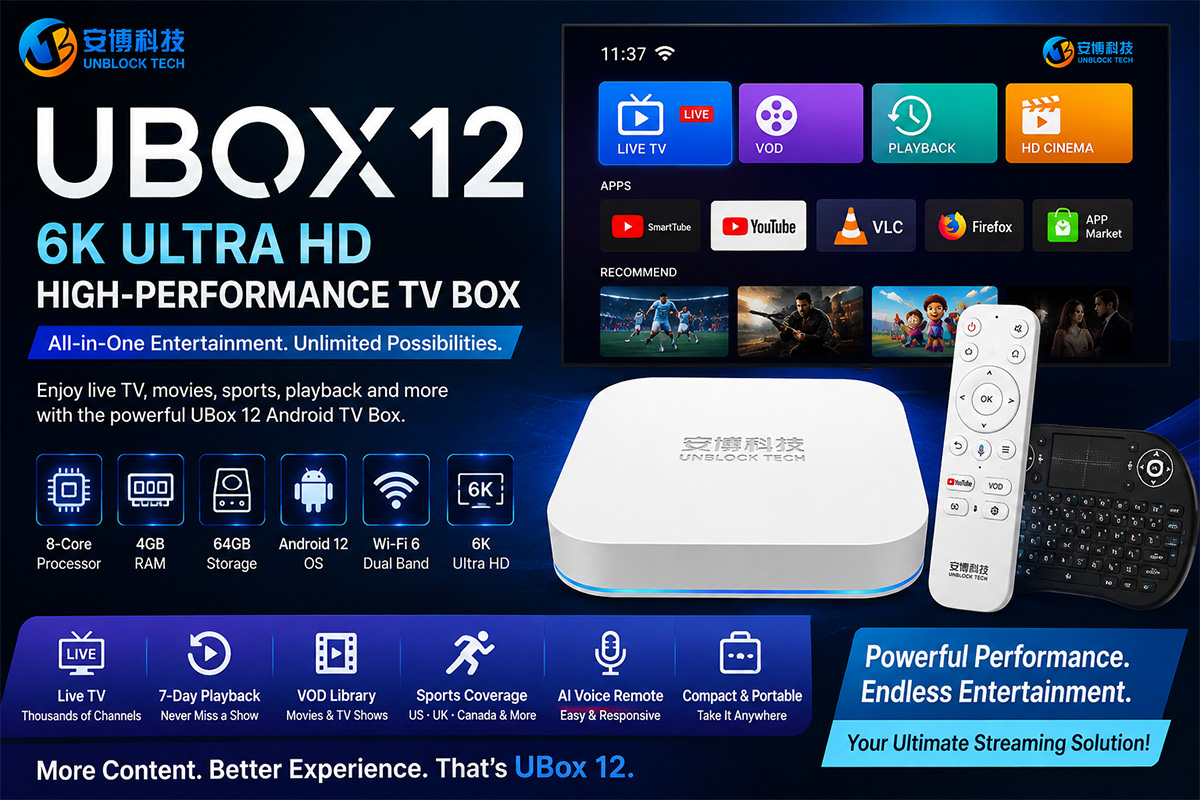
UBox 12 Key Specifications
The UBox 12 comes with several notable hardware features:
8-core processor
4GB RAM
64GB storage
Android 12
Wi-Fi 6
AI voice remote
Up to 6K video resolution
These specifications make the UBox 12 a reasonably well-equipped Android TV box for everyday streaming and multimedia use.
Design and Connectivity
One of the first things that stands out is the white exterior. Unlike many Android TV boxes that use a black design, the UBox 12 has a simple and relatively unobtrusive appearance.
The device includes several connection options. There is a USB port and microSD card slot on the side, while the rear panel provides HDMI, AV, Ethernet, USB, and a power connector.
The box also has mounting holes on the back, which could be useful for users who want to install it behind a television.
Overall, the build feels solid rather than extremely lightweight, while the compact design makes it easy to place in a home entertainment setup.
What's Included in the Box?
The UBox 12 package includes the main TV box, a voice remote, HDMI cables, a power adapter, a user manual, and a mini wireless keyboard.
The included remote is one of the more interesting accessories. It has voice-control functionality and feels solid in the hand. It uses two AAA batteries, although the batteries are not included.
A mini keyboard is also included. While it may not be necessary for everyone, it can be useful for users who prefer typing rather than navigating with a traditional remote.
Setting Up the UBox 12
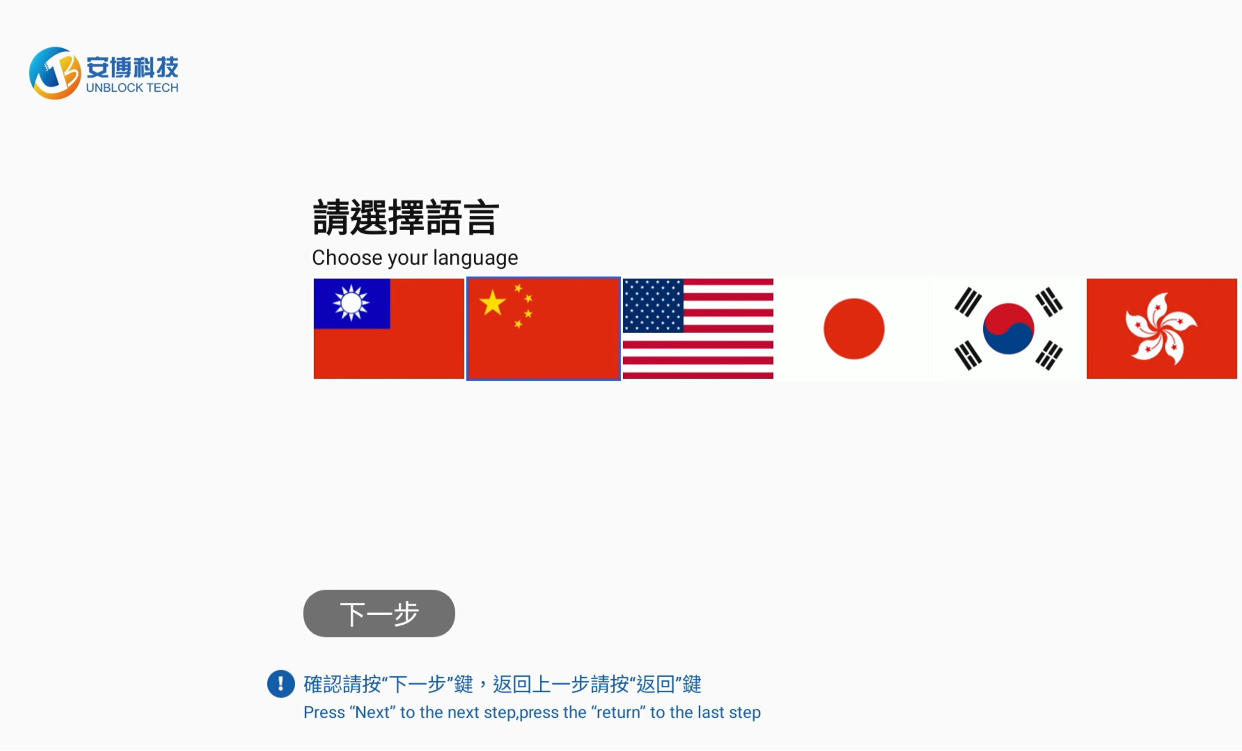
The initial setup is relatively straightforward. After connecting the UBox 12 to a television, users can configure the remote, select their language and region, and connect the device to Wi-Fi.
The setup process also includes several basic screen and navigation instructions.
Once connected to the network, the launcher loads the main home screen, where users can access different folders, applications, and streaming services.
One issue noticed during the setup process is that some parts of the interface are presented in Chinese. This can make navigation slightly more complicated for English-speaking users.
Apps and Streaming Content
The UBox 12 provides access to several dedicated applications and streaming categories.
Among the main applications are:
UP Live
UP Video on Demand
UP TV
UP Playback
HD Theater
SmartTube
YouTube
VLC
Firefox
There is also an app market where additional applications can be installed.
The UP Live section provides live television content, while the Video on Demand and cinema sections offer a large selection of movies and other media.
The movie section includes different categories such as comedy, romance, action, and crime. Users can also search for specific titles instead of browsing through the entire catalog.
Live TV and Playback
The UBox 12 also includes a playback feature that allows users to look back at previously broadcast content. The review indicates that this works similarly to a seven-day catch-up or rewind function.
For users who frequently miss live programs, this type of playback functionality can be particularly useful.
However, some of the menus remain in Chinese, which can make certain features less intuitive for users who primarily use English.
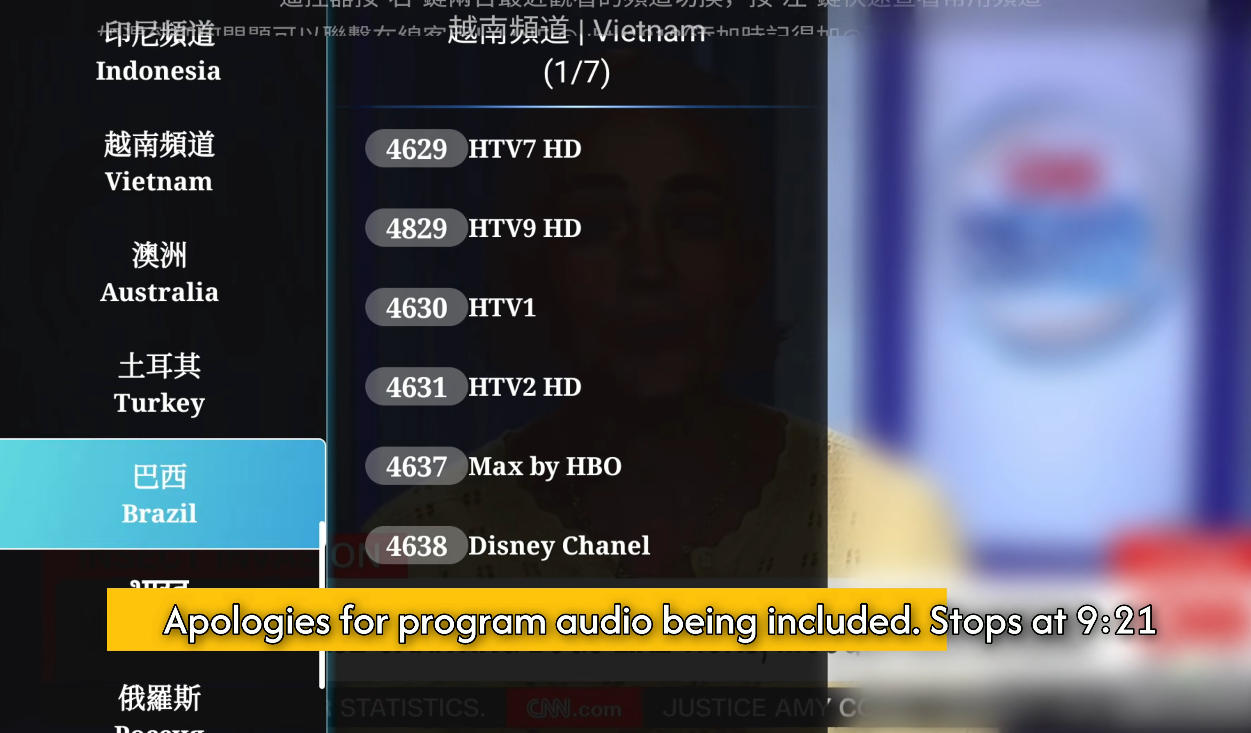
Sports Content Is a Major Highlight
One of the strongest aspects of the UBox 12 in the review is its sports content.
The reviewer found a surprisingly large amount of sports programming covering the United States, the United Kingdom, and Canada. Many of the sporting events being searched for were available through the device.
For sports fans, this is one of the most appealing aspects of the UBox 12.
Performance and Channel Switching
During testing, the UBox 12 generally felt responsive. Applications and menus loaded reasonably quickly, and channel switching was described as fast, with no noticeable lag during the review.
The overall streaming experience was considered solid for the device's price range.
The interface, however, could be improved. The reviewer noted that many menus were displayed in Chinese and suggested that having a cleaner English interface or a more complete language option would make the device easier to use.
Remote Control Experience
The included remote was one of the biggest positives of the review.
It was described as very responsive and did not require precise line-of-sight operation. The reviewer was able to move around and use the remote without having to point it directly at the box.
For an Android TV box, a good remote can make a significant difference in everyday usability, and the UBox 12 performs well in this area.
Portable Design
Another advantage is portability.
Because the UBox 12 is relatively compact and lightweight, it can easily be placed in a backpack and taken on trips or hotel stays.
For users who want to take their streaming setup with them while traveling, this can be a useful feature.
Final Verdict
Overall, the UBox 12 delivers a solid streaming experience with a wide range of content, strong sports coverage, responsive channel switching, and an excellent remote control.
The biggest weakness is the user interface. Some menus are heavily focused on Chinese, which may make navigation less convenient for English-speaking users.
Nevertheless, the reviewer found the device to be a pleasant experience overall, particularly considering its price range of approximately $199–$270.
If you're looking for an Android TV box with a large selection of live TV, movies, playback features, and sports content, the UBox 12 is certainly a device worth considering.
In this review, we'll take a closer look at the UBox 12, including its hardware, included accessories, setup process, apps, streaming experience, and overall performance.
UBox 12 Key Specifications
The UBox 12 comes with several notable hardware features:
8-core processor
4GB RAM
64GB storage
Android 12
Wi-Fi 6
AI voice remote
Up to 6K video resolution
These specifications make the UBox 12 a reasonably well-equipped Android TV box for everyday streaming and multimedia use.
Design and Connectivity
One of the first things that stands out is the white exterior. Unlike many Android TV boxes that use a black design, the UBox 12 has a simple and relatively unobtrusive appearance.
The device includes several connection options. There is a USB port and microSD card slot on the side, while the rear panel provides HDMI, AV, Ethernet, USB, and a power connector.
The box also has mounting holes on the back, which could be useful for users who want to install it behind a television.
Overall, the build feels solid rather than extremely lightweight, while the compact design makes it easy to place in a home entertainment setup.
What's Included in the Box?
The UBox 12 package includes the main TV box, a voice remote, HDMI cables, a power adapter, a user manual, and a mini wireless keyboard.
The included remote is one of the more interesting accessories. It has voice-control functionality and feels solid in the hand. It uses two AAA batteries, although the batteries are not included.
A mini keyboard is also included. While it may not be necessary for everyone, it can be useful for users who prefer typing rather than navigating with a traditional remote.
Setting Up the UBox 12
The initial setup is relatively straightforward. After connecting the UBox 12 to a television, users can configure the remote, select their language and region, and connect the device to Wi-Fi.
The setup process also includes several basic screen and navigation instructions.
Once connected to the network, the launcher loads the main home screen, where users can access different folders, applications, and streaming services.
One issue noticed during the setup process is that some parts of the interface are presented in Chinese. This can make navigation slightly more complicated for English-speaking users.
Apps and Streaming Content
The UBox 12 provides access to several dedicated applications and streaming categories.
Among the main applications are:
UP Live
UP Video on Demand
UP TV
UP Playback
HD Theater
SmartTube
YouTube
VLC
Firefox
There is also an app market where additional applications can be installed.
The UP Live section provides live television content, while the Video on Demand and cinema sections offer a large selection of movies and other media.
The movie section includes different categories such as comedy, romance, action, and crime. Users can also search for specific titles instead of browsing through the entire catalog.
Live TV and Playback
The UBox 12 also includes a playback feature that allows users to look back at previously broadcast content. The review indicates that this works similarly to a seven-day catch-up or rewind function.
For users who frequently miss live programs, this type of playback functionality can be particularly useful.
However, some of the menus remain in Chinese, which can make certain features less intuitive for users who primarily use English.
Sports Content Is a Major Highlight
One of the strongest aspects of the UBox 12 in the review is its sports content.
The reviewer found a surprisingly large amount of sports programming covering the United States, the United Kingdom, and Canada. Many of the sporting events being searched for were available through the device.
For sports fans, this is one of the most appealing aspects of the UBox 12.
Performance and Channel Switching
During testing, the UBox 12 generally felt responsive. Applications and menus loaded reasonably quickly, and channel switching was described as fast, with no noticeable lag during the review.
The overall streaming experience was considered solid for the device's price range.
The interface, however, could be improved. The reviewer noted that many menus were displayed in Chinese and suggested that having a cleaner English interface or a more complete language option would make the device easier to use.
Remote Control Experience
The included remote was one of the biggest positives of the review.
It was described as very responsive and did not require precise line-of-sight operation. The reviewer was able to move around and use the remote without having to point it directly at the box.
For an Android TV box, a good remote can make a significant difference in everyday usability, and the UBox 12 performs well in this area.
Portable Design
Another advantage is portability.
Because the UBox 12 is relatively compact and lightweight, it can easily be placed in a backpack and taken on trips or hotel stays.
For users who want to take their streaming setup with them while traveling, this can be a useful feature.
Final Verdict
Overall, the UBox 12 delivers a solid streaming experience with a wide range of content, strong sports coverage, responsive channel switching, and an excellent remote control.
The biggest weakness is the user interface. Some menus are heavily focused on Chinese, which may make navigation less convenient for English-speaking users.
Nevertheless, the reviewer found the device to be a pleasant experience overall, particularly considering its price range of approximately $199–$270.
If you're looking for an Android TV box with a large selection of live TV, movies, playback features, and sports content, the UBox 12 is certainly a device worth considering.


